Getting Started with DeskDirector
DeskDirector Portals
Browser Support
What is the DeskDirector Admin Portal?
What is the DeskDirector Tech Portal
What is the DeskDirector Client Portal?
Desktop Portal
Managing Your Account
Admin Essentials
DeskDirector Features Overview
Logging in to DeskDirector
User Profiles & Profile Pictures
Managing Tickets with DeskDirector
Office Hours
How Searching Works
Embedding Help Page Media
Get started with the DeskDirector Power Automate Connector
Features
Portal Customization
Forms
Service Catalogue
Communication
Email Connectors
Notifications
Email Notifications
Actionable Messages for Emails
Real-Time Chats
Email Template Engine
Surveys
Broadcasts
Generative AI
Setting up AI Service Providers
Microsoft Foundry for DeskDirector
Knowledge Bases for AI Assistants
Custom Tools for AI Assistants
DeskDirector with Generative AI
AI Assistants in DeskDirector
Ticket Summary for TECH Portal
Advanced
Login & Authentication
Dashboard
Accounts
Contacts
Contact Groups
Approvals
Tags
Custom Domains
Task Lists
File Storage
The Learning Center
Portal Deep Linking
Auditing & Analytics
Microsoft Power Automate
Actions
Solutions
Featured Solution: Teams Ticket Discussion
Power Automate Template Gallery
Featured Solution: Ticket Briefing
Power Automate Administration
DeskDirector Power Platform Connector Reference
Power Automate Connector - Setting up your first flow
Microsoft Teams App
Introducing the DeskDirector for Microsoft Team App
Installing the Microsoft Teams App (Client Mode)
Installing the Microsoft Teams App (TECH Mode)
Setting up Tags for Teams Discussions (TECH Portal)
Branding the DeskDirector Teams App
DeskDirector Teams App Notifications
Contact Groups Integration with Microsoft Teams
Setting up Content Security Policy (CSP)
Advanced topic: Setting up Tech & Client Mode in the same tenancy
Integrating Microsoft Teams with DeskDirector Tech Portal
Smart Alerts for TECH Users
Integrations
Glossary
Security
Troubleshooting
Troubleshooting via Web Developer Tools
Desktop Portal - Common Issues
Contact & Service Agent Impersonation
Approvals - Common Issues
Microsoft Teams App - Common Issues
Email & Email Delivery - Common Issues
Login & Authentication - Common Issues
DeskDirector Desktop App - Installation Issues
Permissions & Access - Common Issues
Contact DeskDirector Support
Troubleshooting DeskDirector Connection Issues
Table of Contents
- All Categories
- Features
- File Storage
File Storage
 Updated
by Niamh Ferns
Updated
by Niamh Ferns
Overview & Limits
Users can upload any kind of file to our file storage with a maximum of 100MB per file.*
File/Media Preview
File storage allows for a wide range of functionality and improvements related to user experience with file attachments. This includes:
- Faster rendering/preview for PDF attachments
- Thumbnails and previews for images. Even with larger images, our implementation will generate an optimised preview and thumbnail while still allowing for downloads at the original image size.
- We now have an experimental HTML5 renderer for video/audio. This allows for media playback before you download it.*
Email Download Links
With our own email delivery solution and file storage, we can allow for faster generation of download links in emails. When relying on a PSA integration's file storage, this would take upwards of 10 to 20 seconds. With our file storage, this can be done in 100 to 200ms. This restriction meant that previously, these download links were not included in emails.*
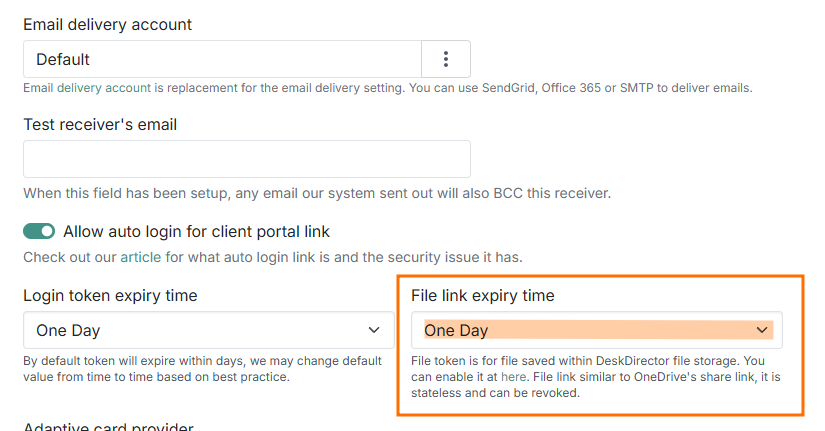
You can also configure the expiry time for files available through email download links under Email Delivery > Settings:
Security
We take security seriously. Any file retrieval, preview, or thumbnail image will go through our permission identity system. Only users with access to a ticket will be able to view attached files.
Download links within emails are different to our front-end portal. If you include a permission token, then downloads can be accessed by anyone within a set amount of time. Without a permission token, our system will require them to log in before they can download or view any files.
Frequently Asked Questions
"Why is an email's download token stateless? Doesn't that expose a security risk?"
Download links inside an email with permission tokens are similar to normal attached files or OneDrive's generated access links. Anyone who has received an email can download and view the file. Our admin portal provides settings for you to opt in and select the expiration time for each download token.
"Will DeskDirector charge us for the amount of space used by file storage?"
At the current stage, no. The cost associated with storage utilisation is included within your subscription.
"Is file storage regionalised?"
Yes. As with databases, it is regionalised, and each customer will have their own Azure blob container. This also ensures that your data is secure and can be deleted if you decide to leave.