Getting Started with DeskDirector
DeskDirector Portals
Browser Support
What is the DeskDirector Admin Portal?
What is the DeskDirector Tech Portal
What is the DeskDirector Client Portal?
Desktop Portal
Managing Your Account
Admin Essentials
DeskDirector Features Overview
Logging in to DeskDirector
User Profiles & Profile Pictures
Managing Tickets with DeskDirector
Office Hours
How Searching Works
Embedding Help Page Media
Get started with the DeskDirector Power Automate Connector
Features
Portal Customization
Forms
Service Catalogue
Communication
Email Connectors
Notifications
Email Notifications
Actionable Messages for Emails
Real-Time Chats
Email Template Engine
Surveys
Broadcasts
Generative AI
Setting up AI Service Providers
Microsoft Foundry for DeskDirector
Knowledge Bases for AI Assistants
Custom Tools for AI Assistants
DeskDirector with Generative AI
AI Assistants in DeskDirector
Ticket Summary for TECH Portal
Advanced
Login & Authentication
Dashboard
Accounts
Contacts
Contact Groups
Approvals
Tags
Custom Domains
Task Lists
File Storage
The Learning Center
Portal Deep Linking
Auditing & Analytics
Microsoft Power Automate
Actions
Solutions
Featured Solution: Teams Ticket Discussion
Power Automate Template Gallery
Featured Solution: Ticket Briefing
Power Automate Administration
DeskDirector Power Platform Connector Reference
Power Automate Connector - Setting up your first flow
Microsoft Teams App
Introducing the DeskDirector for Microsoft Team App
Installing the Microsoft Teams App (Client Mode)
Installing the Microsoft Teams App (TECH Mode)
Setting up Tags for Teams Discussions (TECH Portal)
Branding the DeskDirector Teams App
DeskDirector Teams App Notifications
Contact Groups Integration with Microsoft Teams
Setting up Content Security Policy (CSP)
Advanced topic: Setting up Tech & Client Mode in the same tenancy
Integrating Microsoft Teams with DeskDirector Tech Portal
Smart Alerts for TECH Users
Integrations
Glossary
Security
Troubleshooting
Troubleshooting via Web Developer Tools
Desktop Portal - Common Issues
Contact & Service Agent Impersonation
Approvals - Common Issues
Microsoft Teams App - Common Issues
Email & Email Delivery - Common Issues
Login & Authentication - Common Issues
DeskDirector Desktop App - Installation Issues
Permissions & Access - Common Issues
Contact DeskDirector Support
Troubleshooting DeskDirector Connection Issues
Table of Contents
- All Categories
- Troubleshooting
- Email & Email Delivery - Common Issues
Email & Email Delivery - Common Issues
 Updated
by Niamh Ferns
Updated
by Niamh Ferns
Email & Email Delivery Troubleshooting
Every now and then, you or your customers may encounter issues where they do not receive email notifications in their inbox. You can easily troubleshoot these issues using the "Delivery History" section of the Admin portal. It contains logs of every email sent from our system, including delivery attempts that failed.
In the delivery history page, you can easily filter out the records using several filters:
- Template: The email template that was used.
- TO: Recipient of the email
- Ticket #: Ticket number for the ticket that the email event was related to
- Event: of the email (e.g. Mail Token, Reset Password), et. al.)
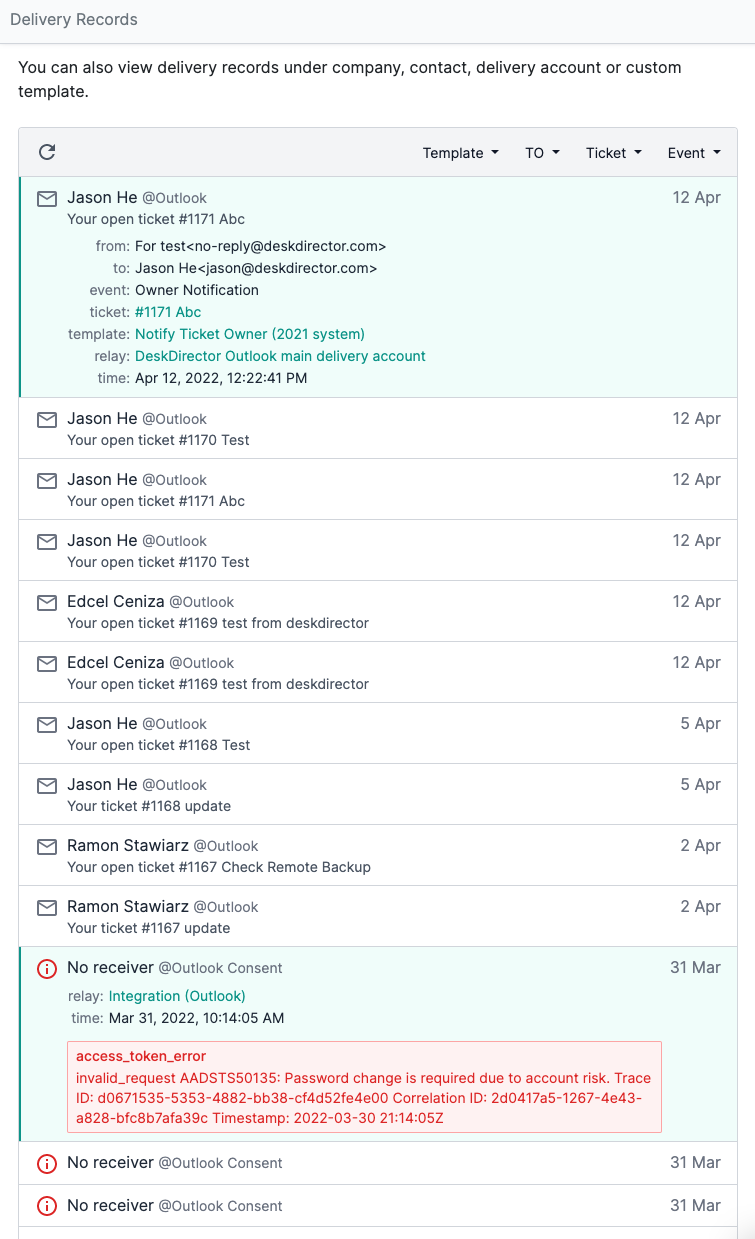
Each delivery record shows details of the notification event, like where the email was sent from, who it was sent to, the event, ticket #, template used, delivery account used and the timestamp. In the above screenshot, you can also see a sample of a failed delivery showing detail for the failure.
Common Email Delivery Issues
"The delivery history shows that an email was sent, but I do not see it in any inbox."
It is best to advise your customers to check the Spam/Junk folder of their inbox. If the email is not there, review any quarantined mail in your Microsoft 365 Admin Portal and, if needed, whitelist your delivery account.