Getting Started with DeskDirector
DeskDirector Portals
Browser Support
What is the DeskDirector Admin Portal?
What is the DeskDirector Tech Portal
What is the DeskDirector Client Portal?
Desktop Portal
Managing Your Account
Admin Essentials
DeskDirector Features Overview
Logging in to DeskDirector
User Profiles & Profile Pictures
Managing Tickets with DeskDirector
Office Hours
How Searching Works
Embedding Help Page Media
Get started with the DeskDirector Power Automate Connector
Features
Portal Customization
Forms
Service Catalogue
Communication
Email Connectors
Notifications
Email Notifications
Actionable Messages for Emails
Real-Time Chats
Email Template Engine
Surveys
Broadcasts
Generative AI
Setting up AI Service Providers
Microsoft Foundry for DeskDirector
Knowledge Bases for AI Assistants
Custom Tools for AI Assistants
DeskDirector with Generative AI
AI Assistants in DeskDirector
Ticket Summary for TECH Portal
Advanced
Login & Authentication
Dashboard
Accounts
Contacts
Contact Groups
Approvals
Tags
Custom Domains
Task Lists
File Storage
The Learning Center
Portal Deep Linking
Auditing & Analytics
Microsoft Power Automate
Actions
Solutions
Featured Solution: Teams Ticket Discussion
Power Automate Template Gallery
Featured Solution: Ticket Briefing
Power Automate Administration
DeskDirector Power Platform Connector Reference
Power Automate Connector - Setting up your first flow
Microsoft Teams App
Introducing the DeskDirector for Microsoft Team App
Installing the Microsoft Teams App (Client Mode)
Installing the Microsoft Teams App (TECH Mode)
Setting up Tags for Teams Discussions (TECH Portal)
Branding the DeskDirector Teams App
DeskDirector Teams App Notifications
Contact Groups Integration with Microsoft Teams
Setting up Content Security Policy (CSP)
Advanced topic: Setting up Tech & Client Mode in the same tenancy
Integrating Microsoft Teams with DeskDirector Tech Portal
Smart Alerts for TECH Users
Integrations
Glossary
Security
Troubleshooting
Troubleshooting via Web Developer Tools
Desktop Portal - Common Issues
Contact & Service Agent Impersonation
Approvals - Common Issues
Microsoft Teams App - Common Issues
Email & Email Delivery - Common Issues
Login & Authentication - Common Issues
DeskDirector Desktop App - Installation Issues
Permissions & Access - Common Issues
Contact DeskDirector Support
Troubleshooting DeskDirector Connection Issues
Table of Contents
- All Categories
- Microsoft Teams App
- Setting up Content Security Policy (CSP)
Setting up Content Security Policy (CSP)
 Updated
by Niamh Ferns
Updated
by Niamh Ferns
Content Security Policy for Teams App
As in Microsoft Teams, tab applications are hosted within iframe elements in Microsoft 365 apps and the Outlook web client.
DeskDirector makes use of Content Security Policy (CSP) headers as a security measure that helps prevent attacks. It is necessary to configure the frame-ancestors settings in your DeskDirector Admin Portal. This should include the Authentication Portal, Client Portal, and TECH Portal.
Setup - Method One
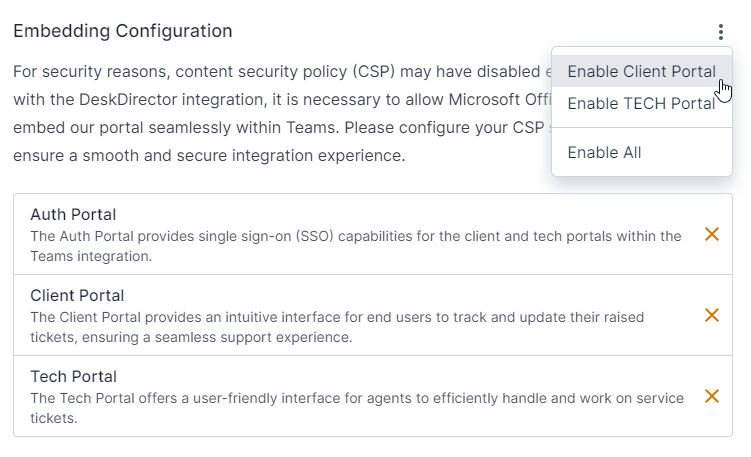
- To set up the required configuration automatically, you can go to your Admin Portal and open
Integrations>Teams. - In the Embedding Configuration section, open the drop-down menu and click on the "Enable Client Portal" and "Enable TECH Portal" options.
- This will automatically add an allow-list to your CSP configuration (the full list of the domains is at the end of this article).
Setup - Method Two
Instructional Video
Step-through:
13 STEPS
1. The first step is to open DeskDirector Admin Portal
2. Scroll and click System
3. Click Security
4. Click TECH Portal
5. Open support.deskdirector and click highlight
6. Open demomsp29.deskdirector and click frame-ancestor-domain
7. Click Allow Embed
8. Open support.deskdirector and click https://teamsapp.deskdirector.com
9. With your mouse, select text in https://teamsapp.deskdirector.com
10. Open demomsp29.deskdirector and click frame-ancestor-domain
11. Click Allow Embed
12. Click Save
13. That's it. You're done.
Here's an interactive tutorial
** Best experienced in Full Screen (click the icon in the top right corner before you begin) **https://www.iorad.com/player/2159323/Teams---set-up-CSP-Security
Required Settings
Host | frame-ancestor permission |
DeskDirector app | https://teamsapp.deskdirector.com |
Microsoft Teams | https://teams.microsoft.com https://*.teams.microsoft.com https://*.skype.com |
Microsoft 365 app | https://*.microsoft365.com https://*.office.com https://*.cloud.microsoft |
Microsoft Outlook | https://outlook.live.com https://outlook.office.com https://outlook.office365.com https://outlook-sdf.office.com https://outlook-sdf.office365.com |